




Editor’s Note: This article is part of a series. View all the articles in this series here: QuickBooks Online Tips
Managing products, services, and inventory in QuickBooks Online (QBO) can feel overwhelming, especially if you’re juggling multiple responsibilities. With invoices, bills, purchase orders, and reports all connected, it’s easy to get lost in the details. However, when used correctly, QBO’s inventory management tools can help you streamline operations, improve accuracy, and make smarter business decisions.
This guide will walk you through setting up products and services, tracking inventory effectively, and using QuickBooks Online’s reports and integrations to maximize efficiency.
Products & services: the foundation of your business
Your Products and Services list serves as the backbone of your business transactions, allowing you to track what you sell, what you buy, and how profitable each item is. Whether you deal with physical goods, digital services, or a combination of both, this list powers your invoices, sales receipts, and expense tracking.
Setting up for success: key configuration steps
Before adding items to your Products and Services list, take time to configure QBO’s settings for optimal performance.
Sales Settings
- Enable product/service columns on sales forms for accurate item tracking.
- Activate price rules if you offer different pricing tiers for customers.
Expense Settings
- Decide whether to track expenses by customer, which is especially useful for job costing.
- Set up billable expenses and define markup percentages.
Sales Tax Configuration
- Ensure sales tax is properly configured for your products and services. This will impact how taxes are calculated on invoices and receipts.
Chart of Accounts
- Your Chart of Accounts should focus on broader income and expense categories that reflect your business structure. Leverage your Products and Services list to track granular, detailed lists of items and customer options.
Building your products and services list
QBO allows you to create and customize different types of items, depending on how you run your business.
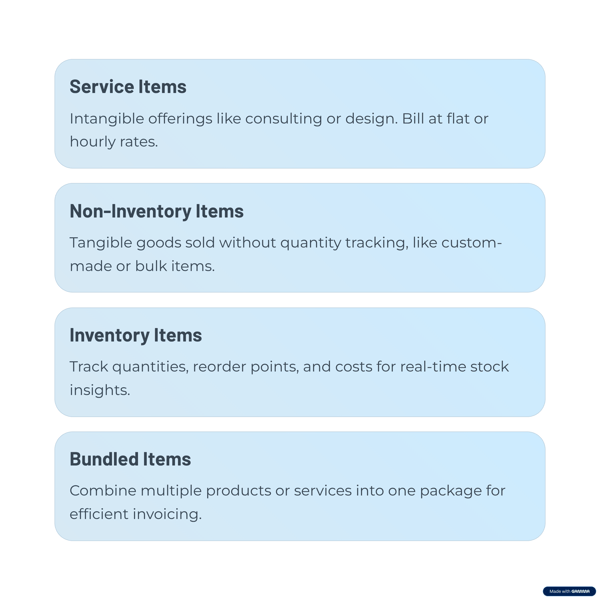
Service Items
- Used for intangible offerings like consulting, design, or subcontracted labor.
- Can be billed at flat rates or hourly pricing.
Non-Inventory Items
- Tangible goods that you sell but don’t track quantities for, such as custom-made items or bulk purchases.
Inventory Items
- Track quantities on hand, reorder points, and costs, providing real-time insights into stock levels and profitability.
Bundled Items
- Combine multiple products and/or services into a single package, making invoicing and pricing more efficient.
 Navigating the inventory maze: should you track inventory?
Not every business needs to track inventory in QBO. Consider the following factors before enabling this feature:
External Inventory Systems
- If you use a point-of-sale (POS) or e-commerce platform that manages inventory, avoid redundant tracking in QBO. Instead, look for integrations that sync inventory data automatically. Even better, leave the inventory analysis to your sales system and just use QBO to track the financial implications.
Complexity and Resources
- Inventory tracking adds a layer of complexity and requires dedicated time and resources. If you manage only a few products, you might opt for periodic manual adjustments instead.
Real-Time Stock Tracking
- If you need to know exact stock levels at any given moment, QBO’s inventory tracking is valuable. Otherwise, periodic inventory counts may be sufficient.
Alternative Approaches: managing inventory without QuickBooks Online tracking features
If QBO’s built-in inventory management doesn’t fit your business model, consider these alternative methods:
Adjusting Entries
- Record all purchases as cost of goods sold (COGS) and use periodic journal entries to adjust inventory asset values based on physical counts.
Margin-Based Adjustments
- Record all purchases as inventory assets and adjust COGS based on sales margins.
- Perform a year-end physical inventory count to reconcile any discrepancies.
Essential inventory management tools in QuickBooks Online
QBO offers several built-in tools to help businesses monitor stock levels and track financial impact.
Inventory Quantity Adjustments
- Adjust recorded inventory to match physical counts, accounting for shrinkage, damage, or theft.
Inventory Valuation Reports
- Inventory Valuation Summary – Provides a snapshot of inventory cost, retail value, and quantity on hand.
- Inventory Valuation Detail – Shows a detailed history of inventory transactions, helping you pinpoint discrepancies.
Beyond the basics: analyzing sales performance
To get the most out of QBO, leverage these sales reports to track performance and profitability.
Profit & Loss by Product/Service
- Breaks down income and cost of goods sold (COGS) for each product or service.
- Helps determine which items generate the most profit.
Sales by Product/Service Summary
- Identifies top-performing products and services based on revenue and volume.
- Assists in forecasting demand and optimizing inventory levels.
Enhancing QuickBooks Online with third-party inventory apps
For businesses that need more advanced inventory tracking, QBO integrates with specialized inventory management apps.
SOS Inventory
- Ideal for businesses requiring assemblies, backorders, and barcode tracking.
Katana
- Designed for manufacturers and wholesalers needing real-time inventory tracking and production planning.
The future of inventory management in QuickBooks Online
Intuit continues to enhance QBO’s inventory capabilities, with upcoming features such as:
- Product Variants – The ability to track multiple variations of a single product, such as different sizes or colors.
- Commerce Center Enhancements – A more robust centralized inventory dashboard for managing stock across multiple sales channels.
Take control of your inventory with QuickBooks Online
By optimizing your Products and Services list, leveraging QBO’s inventory tools, and utilizing advanced reporting, you can streamline your business operations and make informed decisions about your stock levels. Now is the time to master your QBO inventory management features, simplify your workflow and improve accuracy.






Do you have questions about this article? Email us and let us know > info@woodard.com
Comments: